




Seat adjustment view
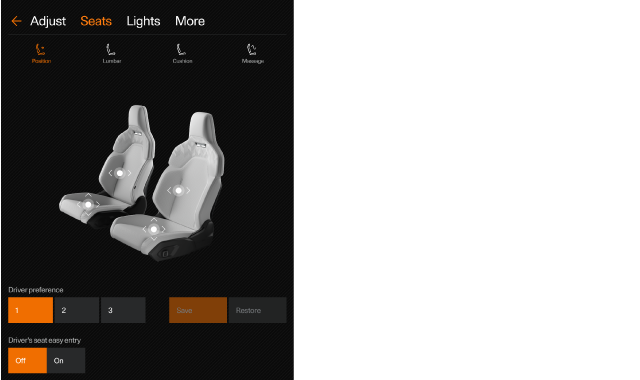
You can use the seat adjustment view to adjust the front seats as an alternative to using the seat adjustment knob. To open the view in the centre display, press the settings symbol  in the top bar and go to .
Tip
Note
Seat adjustments
All available adjustment modes are shown at the top of the seat adjustment view. Select an adjustment mode to see which part of the front seat you can adjust. Press and hold the circular symbols in the seat adjustment view and drag them in the direction you want to adjust the seat.
Massage
You can control the massage function for the front seats by choosing between four different massage programmes and three intensities for each programme.
Driver preference
You can have three different driver seat adjustment presets stored. The currently selected preset is highlighted in the adjustment view. If you select a different preset, the seat will automatically adjust to that saved setting.
If you adjust your seat in the adjustment view, you can save the new position to the currently selected preset. You can also choose to restore the preset to its last saved adjustment.
Driver seat easy entry
If this feature is enabled, the driver seat will move backwards to leave more room to manoeuvre when it's time to get in and out of the car.