




Deactivating Pilot Assist
When you want to stop driving with Pilot Assist, you can deactivate it manually. There are also situations in which Pilot Assist deactivates automatically.
Deactivating and activating Pilot Assist is done in the same way. You simply pull the right-hand side steering wheel stalk downwards. You can also deactivate Pilot Assist by braking.
When you deactivate Pilot Assist, all of its assistance is turned off. This includes speed- and distance-keeping as well as steering assistance.
Deactivating Pilot Assist using the stalk
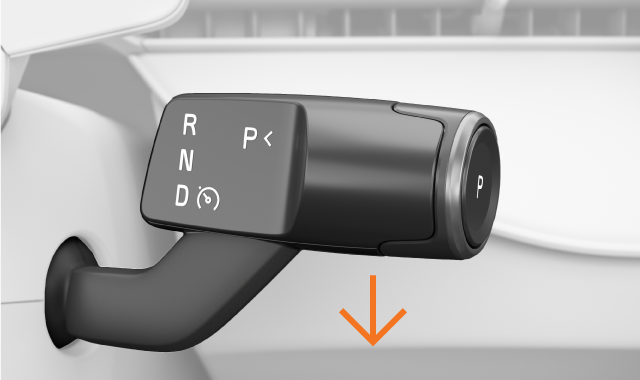
Pull the right-hand side steering wheel stalk all the way down.
Deactivation is confirmed in the driver display.
Deactivating by braking
Press down on the brake pedal.
Deactivation is confirmed in the driver display.
Note
Automatic deactivation
Pilot Assist has several limitations and only works if all the necessary conditions are met. If the driving conditions change during your drive, Pilot Assist can deactivate automatically.
Scenarios where Pilot Assist may automatically deactivate include, but are not limited to, instances where:
- You are not driving actively. You must stay attentive and keep both of your hands on the steering wheel, even if steering assistance is activated.
- You open a door or unbuckle your seatbelt.
- You change gears. Pilot Assist can only support you when D is selected.
- You leave the direction indicator on for a long time when driving with steering assistance. This can indicate that you are not fully focused.
- You manually speed up and maintain a higher driving speed than the target speed. This indicates that you want to return to full manual control of your car.
- Camera or radar conditions for Pilot Assist are not met.
