Collision warnings and mitigation
- Forward collision warnings
- Warnings about vehicles cutting across your lane
- Rear collision warnings
Note
Safety interventions
If an urgent enough collision risk is identified, the car can intervene to avoid or mitigate the collision without any preceding collision warnings. The warnings will then instead be shown simultaneously to the intervention.
Warning
Forward collision warnings
Forward collision warnings can occur if you are getting too close to a vehicle in front of you. The car warns you if it identifies a collision risk that requires your immediate attention.
The situation and level of urgency affect how forward collision warnings are communicated. Warnings can be communicated visually in the driver display, the head-up display, with sound and with brake pulses.
Warnings about vehicles cutting across your lane
Your car can warn you if you are about to be cut off, such as when a vehicle changes lanes just in front of you. Vehicles that swerve or move unpredictably in adjacent lanes can trigger these warnings as well. Your car uses messages in the driver display to warn you in these situations.
Rear collision warnings
If your car identifies a situation with a high risk of a rear collision, it can flash its rear lights to warn drivers behind you. Rear collision warnings appear automatically if you slow down suddenly1, such as during very hard braking. Warnings can also be provided if your car detects a vehicle rapidly approaching from behind. In this case, you do not need to be slowing down for a warning to appear. They can appear both when you're driving and when stopped, but only if your car detects a high enough risk of collision.
If your car identifies a risk of a rear collision, the rear collision warning symbol is shown in the driver display.
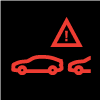
When you are in situations that cause rear collision warnings, your car can pretension your belt as a safety measure. If your car is at a standstill, it also applies hard braking as a precaution in case there is an unavoidable rear collision.
How collision warnings are communicated
How the collision warnings are communicated depends on what type of warning it is and how urgent the situation is. It can also differ depending on which driver display view you have selected. Warnings can be communicated visually in the driver display, the head-up display, with sound and with belt and brake pulses.
When driving at low speed, such as when parking, the parking sensors can identify certain obstacles in your close vicinity. Your car will usually alert you to these obstacles in the parking view as well as with a sound alert. You can adjust the volume of these sound alerts in the parking view settings.
Note
Collision response
If a collision cannot be avoided, the car can respond in other ways to protect occupants and reduce the danger to surrounding traffic. Read more about these features in the safety section of this manual.